
Almost two weeks ago, the Kubernetes SIG Network and the Security Response Committee announced the upcoming retirement of Ingress NGINX , scheduled for March 2026.
For anyone who has not spent too much time deep in Kubernetes networking, Ingress NGINX is a Kubernetes controller that uses NGINX under the hood and is responsible for exposing services externally. It acts as a reverse proxy and load balancer for Kubernetes Ingress resources. An Ingress, in Kubernetes terms, is an API object used to manage external access to Services in a cluster, usually over HTTP or HTTPS.
This announcement matters quite a lot because Ingress NGINX is deployed virtually everywhere, from large production datacenters to tiny homelabs powered by leftover Raspberry Pis. All of these clusters will need to migrate to something else before the product reaches End Of Support. That is why I started evaluating the available options.
The easiest path is migrating to a different Ingress controller. Kubernetes maintains an official list of alternatives . At first glance, it sounds like a good idea…but it’s not, at least if you care about a long-term approach. Indeed new API object is set to replace the existing Ingress API.
This new resource is the Gateway API.
About Gateway API
Gateway API is an official Kubernetes project designed for L4 and L7 routing. It represents the next generation of Ingress, Load Balancing and Service Mesh APIs. The goal of the project is to provide a generic, expressive and role oriented model.
- Generic, because the API is no longer bound to controller specific behavior. For instance, Ingress NGINX relies on annotations that only its own controller understands. These annotations do not work if you switch to a controller like Traefik.
- Expressive, because the Gateway API uses clear and explicit syntax. No more mysterious annotations required for features like header based routing or traffic weighting.
- Role oriented, because it introduces a well defined set of personas that control different aspects of traffic management.
Thanks to this design, it becomes possible to move between Gateway implementations without rewriting your Gateway resources from scratch. It should feel as refreshing as finally deleting that 5000 line values.yaml file you have been pretending to understand.
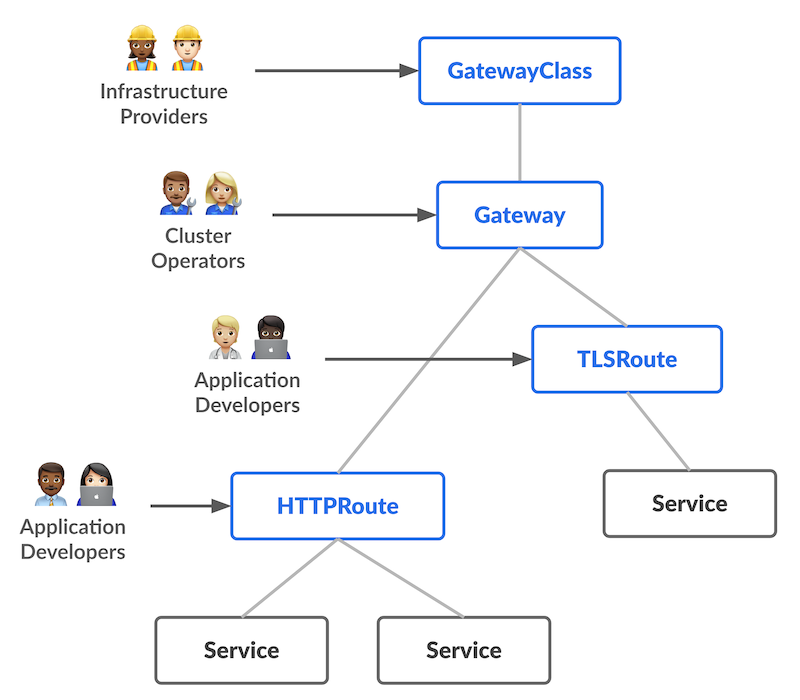
Gateway API defines three roles:
- the infrastructure provider, which selects the gateway controller that will handle traffic. This role defines the
GatewayClassresource. - the cluster operator, which manages clusters, sets policies and defines the actual
Gatewayresource that exposes entry points. - the application developer, who configures routing and Service composition at the application level (
HTTPRoute).
The diagram below illustrates these roles visually.
Simulate a migration
Create the test environment
Now that the Gateway API concepts are a bit more clear, it is time to get hands on. The goal is to migrate from Ingress resources backed by Ingress NGINX to the Gateway API.
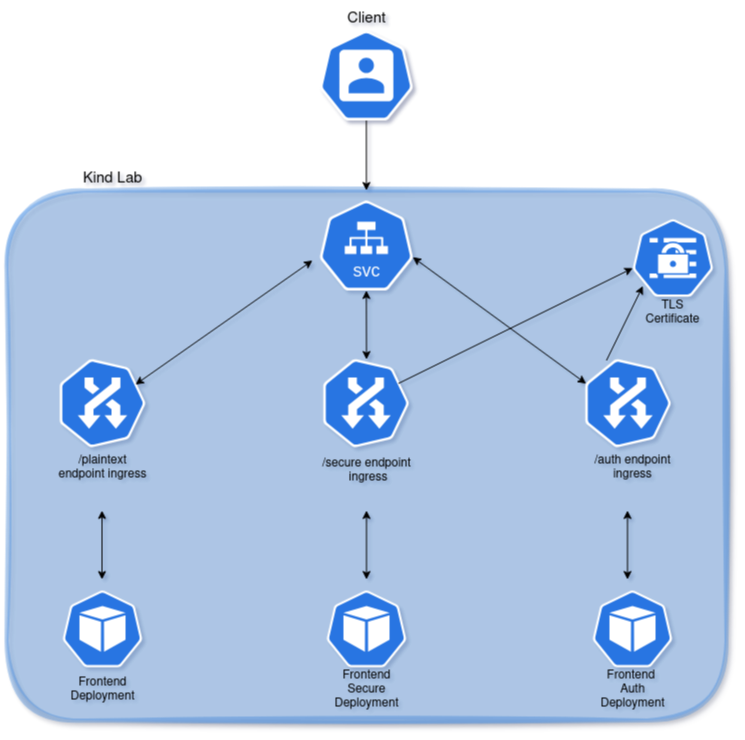
I created a test environment using kind and Cloud Provider Kind tools, described in more detail in a previous post , with the following characteristics:
- A cluster with one control plane node and one worker node.
- Cilium v1.18.2 installed as a kube-proxy replacement. Cilium will later be upgraded to support the Gateway API.
- Installation of Ingress NGINX.
- Installation of Cert Manager to issue a self signed certificate.
- Creation of three Ingress resources to test HTTP, HTTPS and HTTPS with basic authentication.
Here is the topology diagram, which hopefully makes everything easier to follow. If not, feel free to blame the diagram not the author 🤣
The kind cluster configuration file I used is:
kind: Cluster
apiVersion: kind.x-k8s.io/v1alpha4
name: kubetest
nodes:
- role: control-plane
- role: worker
networking:
  disableDefaultCNI: true
kubeProxyMode: "none"Cilium was installed with:
# install cilium
cilium install \
    --version 1.18.2 \
    --set kubeProxyReplacement=true,routingMode=native,autoDirectNodeRoutes=true,loadBalancer.mode=dsr,ipv4NativeRoutingCIDR="10.244.0.0/16"
# Wait for Cilium installation
cilium status --waitIngress NGINX and Cert Manager were installed with:
# Create Ingress Nginx controller
kubectl apply -f https://raw.githubusercontent.com/kubernetes/ingress-nginx/controller-v1.14.0/deploy/static/provider/cloud/deploy.yaml
# deploy cert manager, create an Issuer and create a self signed certificate
kubectl apply -f https://github.com/cert-manager/cert-manager/releases/download/v1.19.1/cert-manager.yamlWait until all pods are up and running, then go ahead to the next step.
Now we are ready do deploy our playground! The next file creates:
- a cert-manager issuer
- a self-signed certificate
- 3 deployments, one for the HTTP test, one for the HTTPS and another one for HTTPS+basic authentication.
- 3 Cluster IP Services, one for each deployment
- 3 Ingress, one for each endpoint we want to create:
/plaintextendpoint for the HTTP test/secureendpoint for the HTTPS test/authendpoint for the HTTPS+basic authentication
- a secret to store the
admin:passwordcredentials for the basic authentication
apiVersion: cert-manager.io/v1
kind: Issuer
metadata:
  name: selfsigned-issuer
  namespace: default
spec:
  selfSigned: {}
---
apiVersion: cert-manager.io/v1
kind: Certificate
metadata:
  name: my-selfsigned-cert
  namespace: default
spec:
  secretName: my-selfsigned-cert
  duration: 8760h # 1 year
  renewBefore: 720h # 1 month
  issuerRef:
    name: selfsigned-issuer
    kind: Issuer
  commonName: example.com
---
apiVersion: apps/v1
kind: Deployment
metadata:
  labels:
    app: frontend-secure
  name: frontend-secure
spec:
  replicas: 1
  selector:
    matchLabels:
      app: frontend-secure
  strategy: {}
  template:
    metadata:
      labels:
        app: frontend-secure
    spec:
      containers:
      - image: nginx:latest
        name: nginx
        resources: {}
status: {}
---
apiVersion: apps/v1
kind: Deployment
metadata:
  labels:
    app: frontend
  name: frontend
spec:
  replicas: 1
  selector:
    matchLabels:
      app: frontend
  strategy: {}
  template:
    metadata:
      labels:
        app: frontend
    spec:
      containers:
      - image: nginx:latest
        name: nginx
        resources: {}
status: {}
---
apiVersion: apps/v1
kind: Deployment
metadata:
  labels:
    app: frontend-auth
  name: frontend-auth
spec:
  replicas: 1
  selector:
    matchLabels:
      app: frontend-auth
  strategy: {}
  template:
    metadata:
      labels:
        app: frontend-auth
    spec:
      containers:
      - image: nginx:latest
        name: nginx
        resources: {}
status: {}
---
apiVersion: v1
kind: Service
metadata:
  labels:
    app: frontend-secure
  name: frontend-secure-svc
spec:
  ports:
  - port: 80
    protocol: TCP
    targetPort: 80
  selector:
    app: frontend-secure
  type: ClusterIP
status:
  loadBalancer: {}
---
apiVersion: v1
kind: Service
metadata:
  labels:
    app: frontend
  name: frontend-svc
spec:
  ports:
  - port: 80
    protocol: TCP
    targetPort: 80
  selector:
    app: frontend
  type: ClusterIP
status:
  loadBalancer: {}
---
apiVersion: v1
kind: Service
metadata:
  labels:
    app: frontend-auth
  name: frontend-auth-svc
spec:
  ports:
  - port: 80
    protocol: TCP
    targetPort: 80
  selector:
    app: frontend-auth
  type: ClusterIP
status:
  loadBalancer: {}
---
apiVersion: networking.k8s.io/v1
kind: Ingress
metadata:
  name: frontend-ingress
  namespace: default
  annotations:
    nginx.ingress.kubernetes.io/rewrite-target: /
spec:
  ingressClassName: nginx
  rules:
  - http:
      paths:
      - backend:
          service:
            name: frontend-svc
            port:
              number: 80
        path: /plaintext
        pathType: Prefix
---
apiVersion: networking.k8s.io/v1
kind: Ingress
metadata:
  name: frontend-secure-ingress
  namespace: default
  annotations:
    nginx.ingress.kubernetes.io/force-ssl-redirect: 'true'
    nginx.ingress.kubernetes.io/rewrite-target: /
spec:
  tls:
    - secretName: my-selfsigned-cert
  ingressClassName: nginx
  rules:
  - http:
      paths:
      - backend:
          service:
            name: frontend-secure-svc
            port:
              number: 80
        path: /secure
        pathType: Prefix
---
apiVersion: v1
data:
  auth: YWRtaW46JGFwcjEkZnlTWEZjRGokUnpJbjMvZkhRU2dRcGNvQ2Y0V1NqMQ==
kind: Secret
metadata:
  name: auth-secret
---
apiVersion: networking.k8s.io/v1
kind: Ingress
metadata:
  name: frontend-auth-ingress
  namespace: default
  annotations:
    # Basic authentication
    nginx.ingress.kubernetes.io/auth-type: basic
    nginx.ingress.kubernetes.io/auth-secret: auth-secret
    nginx.ingress.kubernetes.io/auth-realm: "Authentication Required"
    # Rewrite path
    nginx.ingress.kubernetes.io/rewrite-target: /
    # SSL
    nginx.ingress.kubernetes.io/force-ssl-redirect: 'true'
spec:
  ingressClassName: nginx
  tls:
    - secretName: my-selfsigned-cert
  rules:
  - http:
      paths:
      - backend:
          service:
            name: frontend-auth-svc
            port:
              number: 80
        path: /auth
pathType: PrefixOnce the pods are running, update each NGINX container’s index.html file, so that every endpoint could return a different response. This makes testing easier and adds just a bit of flair.
kubectl exec -it $(kubectl get po -l app=frontend -o jsonpath='{.items[0].metadata.name}') -- sh -c 'echo "<html><h1> HTTP site </h1></html>" > /usr/share/nginx/html/index.html'
kubectl exec -it $(kubectl get po -l app=frontend-secure -o jsonpath='{.items[0].metadata.name}') -- sh -c 'echo "<html><h1> HTTPS site </h1></html>" > /usr/share/nginx/html/index.html'
kubectl exec -it $(kubectl get po -l app=frontend-auth -o jsonpath='{.items[0].metadata.name}') -- sh -c 'echo "<html><h1> HTTPS and basic auth site </h1></html>" > /usr/share/nginx/html/index.html'Then validate that all Ingress endpoints are working correctly with curl:
$ kubectl get ingress
NAME                      CLASS   HOSTS   ADDRESS      PORTS     AGE
frontend-ingress          nginx   *       172.19.0.4   80        20s
frontend-secure-ingress   nginx   *       172.19.0.4   80, 443   20s
frontend-auth-ingress     nginx   *       172.19.0.4   80, 443   20s
$ curl http://172.19.0.4/plaintext
<html><h1> HTTP POD </h1></html>
$ $ curl -k https://172.19.0.4/secure
<html><h1> HTTPS POD </h1></html>
$ curl -k https://172.19.0.4/auth
<html>
<head><title>401 Authorization Required</title></head>
<body>
<center><h1>401 Authorization Required</h1></center>
<hr><center>nginx</center>
</body>
</html>
$ curl -k https://172.19.0.4/auth  -u admin:password
<html><h1> HTTPS and basic auth site </h1></html>Now it’s time to migrate!
Install Gateway CRD
Gateway is a Custom Resource, so the CRDs must be installed first.
# Install the Gateway Custom resource definition files first
kubectl apply --server-side -f https://github.com/kubernetes-sigs/gateway-api/releases/download/v1.4.0/standard-install.yamlUpgrade Cilium and enable Gateway API support
Cilium needs to be upgraded to a version that supports Gateway API. In a real environment, this is a very common situation, this is way I wanted to replicate it here.
# upgrade cilium to enable Gateway API feature
cilium upgrade --version 1.18.4 --set gatewayAPI.enabled=trueMigrate
For the migration, I used ingress2gateway, a tool that converts existing Ingress resources and provider specific configurations to Gateway API resources. It’s managed by the Gateway API SIG-Network subproject.
So download and execute the binary, then store the converted file into a yaml file:
curl -L https://github.com/kubernetes-sigs/ingress2gateway/releases/download/v0.4.0/ingress2gateway_Linux_x86_64.tar.gz | tar -xz
./ingress2gateway print --providers ingress-nginx > ingress-2-gateway.yamlThe generated file contains a Gateway with two listeners, HTTP and HTTPS. However, several adjustments are required because the tool used for the conversion simply translates an Ingress into the equivalent Gateway and HTTPRoute resources, assuming that the same operator will be used. In our case, we are not only switching from Ingress to the Gateway API, but also changing operator - from ingress-nginx to Cilium - which requires additional modifications.
The changes we need to apply are:
- Rename the Gateway from
nginxtocilium. - Update the
gatewayClassNamefromnginxtocilium. - Adjust all
parentRefsin the HTTPRoute to match the new name. - Rename the route to something clearer.
- As documented in the tool’s GitHub repository , the Ingress-NGINX annotations used in my Ingress resources are currently not supported. This means the generated files must be manually adjusted to include the missing functionality.
- The TLS certificate used for terminating HTTPS on two different endpoints appears twice in the generated YAML, because I used the same TLS certificate for 2 services. While this does not cause functional issues, it is unnecessary duplication and feels messy to me.
- The generated file contains a single HTTPRoute, but we actually need two: one for HTTP traffic and another for HTTPS traffic, where TLS termination must be defined. Each route also needs to be correctly attached to its respective listener (http or https).
- Path rewrites are missing from all endpoints. Without adding them manually, every request to the configured paths would return a 404 error.
- I also want to improve overall readability of the generated file by naming each route explicitly and reorganizing the blocks into a clearer structure.
The final cleaned up file is shown below.
apiVersion: gateway.networking.k8s.io/v1
kind: Gateway
metadata:
  name: cilium
  namespace: default
spec:
  gatewayClassName: cilium
  listeners:
  - name: http
    port: 80
    protocol: HTTP
  - name: https
    port: 443
    protocol: HTTPS
    tls:
      certificateRefs:
      - name: my-selfsigned-cert
---
apiVersion: gateway.networking.k8s.io/v1
kind: HTTPRoute
metadata:
  name: frontend-http-route
  namespace: default
spec:
  parentRefs:
  - name: cilium
    sectionName: http # attach to http listener of the gateway
  rules:
  - name: path-to-http-svc
    matches:
    - path:
        type: PathPrefix
        value: /plaintext
    filters:
    - type: URLRewrite
      urlRewrite:
        path:
          # Use ReplacePrefixMatch to replace the matched prefix (/plaintext)
          # with the desired replacement path (/)
          type: ReplacePrefixMatch
          replacePrefixMatch: /
    backendRefs:
    - name: frontend-svc
      port: 80
---
apiVersion: gateway.networking.k8s.io/v1
kind: HTTPRoute
metadata:
  name: frontend-https-route
  namespace: default
spec:
  parentRefs:
  - name: cilium
    sectionName: https # connect to https listener
  rules:
  # path to authentication svc
  - name: path-to-auth-svc
    matches:
    - path:
        type: PathPrefix
        value: /auth
    filters:
    - type: URLRewrite
      urlRewrite:
        path:
          # replace /auth prefix with /
          type: ReplacePrefixMatch
          replacePrefixMatch: /
    backendRefs:
    - name: frontend-auth-svc
      port: 80

  # Path to secure svc
  - name: path-to-secure-svc
    matches:
    - path:
        type: PathPrefix
        value: /secure
    filters:
    - type: URLRewrite
      urlRewrite:
        path:
          # replace /secure prefix with /
          type: ReplacePrefixMatch
          replacePrefixMatch: /
    backendRefs:
    - name: frontend-secure-svc
port: 80After applying the file, the Gateway and HTTPRoutes can be verified with:
$ kubectl get gateway,httproute
NAME                                       CLASS    ADDRESS      PROGRAMMED   AGE
gateway.gateway.networking.k8s.io/cilium   cilium   172.19.0.5   True         27s

NAME                                                       HOSTNAMES   AGE
httproute.gateway.networking.k8s.io/frontend-http-route                27s
httproute.gateway.networking.k8s.io/frontend-https-route 27sEverything should now be correctly configured.
And now the final test…let’s check them with curl!
$ curl http://172.19.0.5/plaintext
<html><h1> HTTP site </h1></html>
$ curl -k https://172.19.0.5/secure
<html><h1> HTTPS site </h1></html>
$ curl -k https://172.19.0.5/auth
<html><h1> HTTPS and basic auth site </h1></html>At this point, almost all the functionality previously delivered through Ingress NGINX is now handled via the Gateway API, with Cilium acting as the controller. However, one important piece is still missing: the final endpoint (/auth) needs TLS termination (which is already in place) and basic authentication, which is not there. So it looks like basic auth is not working at all.
While exploring Cilium’s GitHub issues, I found this one: https://github.com/cilium/cilium/issues/23797
It has been open since February 2023 and although there has been ongoing work, authentication management (including simple basic authentication) still isn’t implemented. What does this mean? For now, Cilium may not be ready to fully replace Ingress NGINX. So the options might be:
- try a different Gateway controller that supports basic authentication
- use a dedicated service to handle authentication
- switch to a different Ingress controller while waiting for Cilium to implement authentication (if it ever happens)
- consider any other alternatives that might fit the use case
Since the Gateway API is still relatively new (despite being GA), some areas are still evolving and this can influence the decision to migrate.
So what’s now?
Looking around, I checked the Traefik documentation and it seems to be the right tool to achieve the goal. It supports the nginx annotations I used in my secrets, it could even be a drop-in replacement for Ingress-NGINX if I wanted to stick with Ingress resources (yeah, that sounds powerful! But no, I want to switch to Gateway APIs to avoid another migration in the near future) and it offers basic authentication middleware through ExtensionRef in HTTPRoutes, since basic auth is not a core feature of Gateway API.
Let’s give it a try.
Migrate: 2nd attempt
Recreate a new environemnt, but this time skip the step which enable Gateway API support in cilium.
Let’s use helm to deploy Traefik. Create a traefik-values.yaml file and put this content:
ports:
  web:
    port: 80
  websecure:
    port: 443

ingressClass:
  enabled: false

providers:
  kubernetesGateway:
    enabled: true
    kubernetesIngress: false

gateway:
  listeners:
    web:
      port: 80
      protocol: HTTP
      namespacePolicy:
        from: All

    websecure:
      port: 443
      protocol: HTTPS
      namespacePolicy:
        from: All
      mode: Terminate
      certificateRefs:
        - kind: Secret
          name: my-selfsigned-cert

api:
dashboard: falseThis helm values will deploy Traefik with Gateway API support, disable Ingress support, disable the dashboard and create a Gateway resource with an HTTP and an HTTPS listeners.
Let’s install traefik with:
helm repo add traefik https://traefik.github.io/charts
helm repo update
helm upgrade --install traefik traefik/traefik \
  --version 37.4.0 \
  --namespace traefik \
  --create-namespace \
  --values traefik-values.yaml \
--waitnow since the Gateway API has strict cross-namespace security, unlike Ingress, a Listener cannot read Secrets outside its own namespace without explicit permission. So we need to create a ReferenceGrant to allow that HTTPS listener to use the certificate created in another namespace or we can patch the existing certificate to enable Reflector, a tool that will sync a certificate’s secret across multiple namespaces.
Let’s install reflector first:
helm repo add emberstack https://emberstack.github.io/helm-charts
helm repo update
helm upgrade --install reflector emberstack/reflectorThen patch the certificate, applying this yaml with kubectl apply -f:
apiVersion: cert-manager.io/v1
kind: Certificate
metadata:
  name: my-selfsigned-cert
  namespace: default
spec:
  secretName: my-selfsigned-cert
  duration: 8760h # 1 year
  renewBefore: 720h # 1 month
  issuerRef:
    name: selfsigned-issuer
    kind: Issuer
  commonName: example.com
  secretTemplate: # This is the part used by Reflector
    annotations:
      reflector.v1.k8s.emberstack.com/reflection-allowed: "true"
      reflector.v1.k8s.emberstack.com/reflection-allowed-namespaces: "traefik"  # Control destination namespaces
      reflector.v1.k8s.emberstack.com/reflection-auto-enabled: "true" # Auto create reflection for matching namespaces
reflector.v1.k8s.emberstack.com/reflection-auto-namespaces: "traefik" # Control auto-reflection namespacesand check if the TLS secret has been mirrored with:
$ kubectl get secret -n traefik my-selfsigned-cert
NAME                 TYPE                DATA   AGE
my-selfsigned-cert kubernetes.io/tls 3 6m33sIt’s there! So Reflector is doing it’s job.
We should now be ready to edit the Gateway resource YAML file we saved when we ran the ingress2gateway binary, adding the filter for basic authentication, which looks like this:
filters:
- type: ExtensionRef
  extensionRef:
    group: traefik.io
    kind: Middleware
name: auth-layerand we also need to create that middleware.
By applying the following YAML, we set the Traefik gatewayClass, create the middleware for authentication, create the HTTPRoute resources and set the middleware reference in the endpoint that needs basic authentication:
apiVersion: traefik.io/v1alpha1
kind: Middleware
metadata:
  name: auth-layer
  namespace: default
spec:
  basicAuth:
    secret: auth-secret
---
apiVersion: gateway.networking.k8s.io/v1
kind: HTTPRoute
metadata:
  name: frontend-http-route
  namespace: default
spec:
  parentRefs:
  - name: traefik-gateway
    sectionName: web # attach to web listener of the gateway
    namespace: traefik
  rules:
  - name: path-to-http-svc
    matches:
    - path:
        type: PathPrefix
        value: /plaintext
    filters:
    - type: URLRewrite
      urlRewrite:
        path:
          # Use ReplacePrefixMatch to replace the matched prefix (/plaintext)
          # with the desired replacement path (/)
          type: ReplacePrefixMatch
          replacePrefixMatch: /
    backendRefs:
    - name: frontend-svc
      port: 80
---
apiVersion: gateway.networking.k8s.io/v1
kind: HTTPRoute
metadata:
  name: frontend-https-route
  namespace: default
spec:
  parentRefs:
  - name: traefik-gateway
    sectionName: websecure # connect to websecure listener
    namespace: traefik
  rules:
  # path to authentication svc
  - name: path-to-auth-svc
    matches:
    - path:
        type: PathPrefix
        value: /auth
    filters:
    - type: URLRewrite
      urlRewrite:
        path:
          # replace /auth prefix with /
          type: ReplacePrefixMatch
          replacePrefixMatch: /
    - type: ExtensionRef
      extensionRef:
        group: traefik.io
        kind: Middleware
        name: auth-layer
    backendRefs:
    - name: frontend-auth-svc
      port: 80

  # Path to secure svc
  - name: path-to-secure-svc
    matches:
    - path:
        type: PathPrefix
        value: /secure
    filters:
    - type: URLRewrite
      urlRewrite:
        path:
          # replace /secure prefix with /
          type: ReplacePrefixMatch
          replacePrefixMatch: /
    backendRefs:
    - name: frontend-secure-svc
port: 80Now we are ready to test the solution again with curl. First check the Gateway IP:
$ kubectl get gateway -A
NAMESPACE   NAME              CLASS     ADDRESS      PROGRAMMED   AGE
traefik traefik-gateway traefik 172.19.0.2 True 2m30sthen use it with curl against all the routes we created:
$ curl http://172.19.0.2/plaintext
<html><h1> HTTP site </h1></html>
$ curl https://172.19.0.2/secure
curl: (60) SSL certificate problem: self-signed certificate
More details here: https://curl.se/docs/sslcerts.html

curl failed to verify the legitimacy of the server and therefore could not
establish a secure connection to it. To learn more about this situation and
how to fix it, please visit the web page mentioned above.
$ curl -k https://172.19.0.2/secure
<html><h1> HTTPS site </h1></html>
$ curl -k https://172.19.0.2/auth
401 Unauthorized
$ curl -k https://172.19.0.2/auth -u admin:password
<html><h1> HTTPS and basic auth site </h1></html>This confirms that all three endpoints are working as expected:
- the
/plaintextendpoint correctly responds over HTTP - the
/secureendpoint is properly served over HTTPS - the
/authendpoint is served over HTTPS and requires basic authentication to display the page
In conclusion…
The retirement of Ingress NGINX is a major shift for the Kubernetes community. Although migrating to another Ingress controller might look like the easy path, the Gateway API represents the future of traffic management in Kubernetes clusters. It introduces a cleaner model, clearer responsibilities and much better portability across implementations.
As shown in this walkthrough, the migration process is manageable, especially with tooling like ingress2gateway - although some manual refinement may still needed - based on the Ingress Controller you use. If you start evaluating your own migration plans now, you will have plenty of time to prepare your clusters before March 2026 arrives, hopefully without turning your coffee consumption into a performance bottleneck.
While I wasn’t able to fully achieve my initial goal of using Cilium as a Gateway controller to fully replace Ingress NGINX, I was able to fully replace it with Traefik!
If you have not tested Gateway API yet, this is a great moment to dive in and experiment; your future self and - probably - your future cluster, will thank you.
Happy migration planning!