
There is a category of infrastructure problem that cloud environments solve by making it expensive to ignore: the gap between your local test setup and what actually runs in production.
Simplified local clusters, mocked dependencies and single or multi-node Kubernetes distributions are fast to spin up, but they paper over the networking behavior, resource contention and tooling quirks that only surface under realistic conditions. Cloud environments solve this faithfully, but they keep billing you whether or not you are actively testing anything. There is also another option, we discussed in this blog in the past: run kubernetes in docker .
But what if I don’t want to focus only on kubernetes but at the whole infrastructure instead?
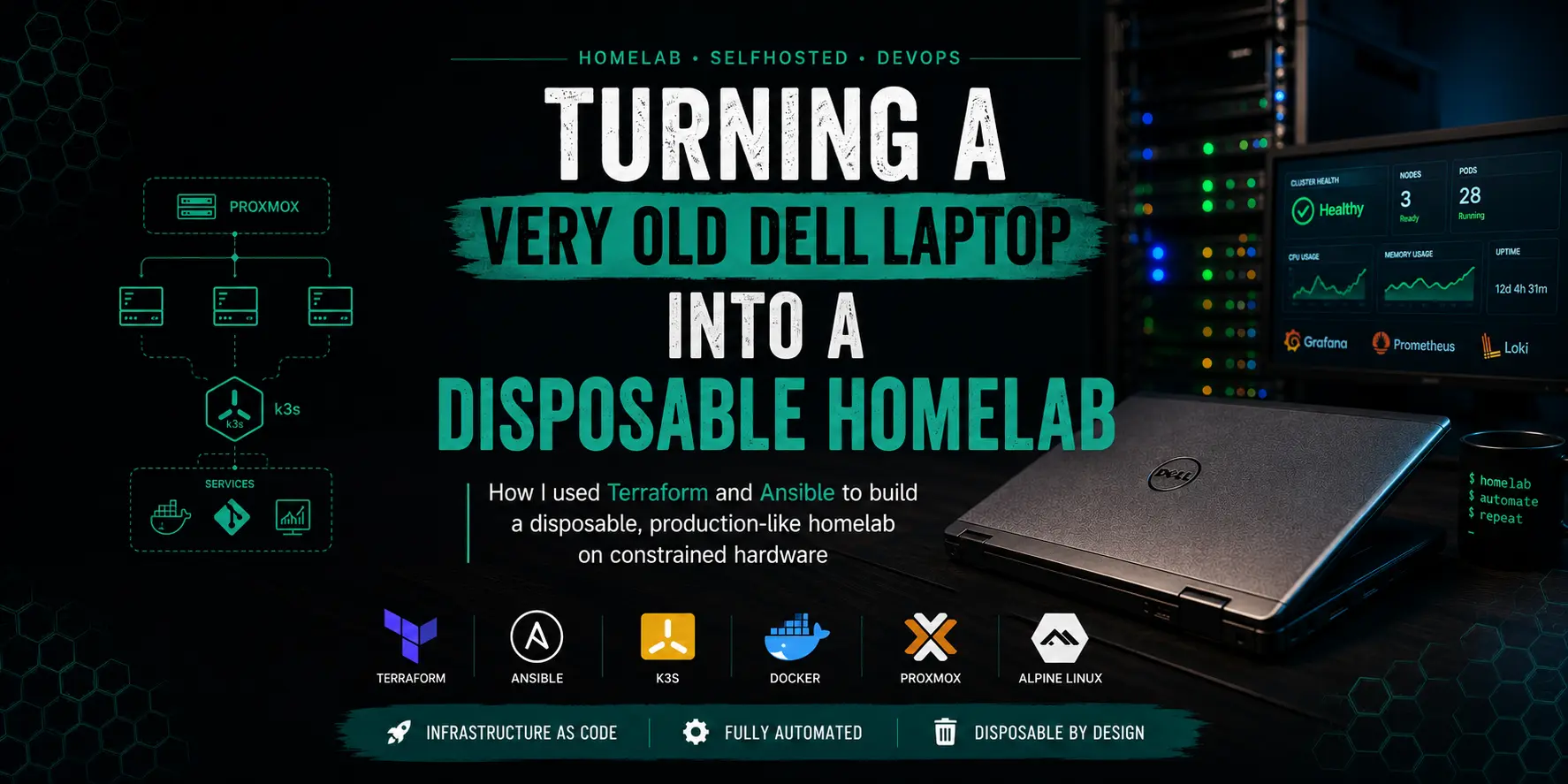
This post is about a fourth option: a disposable, production-like homelab running on a 2013 Dell laptop, provisioned entirely with Terraform and Ansible and built around Alpine Linux to survive on genuinely constrained hardware. The goal was a setup you can spin up when you need it, test against with confidence and tear down completely when you are done. Everything that follows is a detailed account of how that was built, what broke along the way and what the final architecture looks like.
The Hardware: A “Server” You Can Close the Lid On
Every good homelab story starts with hardware that has no business running a Kubernetes cluster.
Mine is a Dell P25G, a laptop I bought when I left my previous job, mostly as a “I’ll figure out what to do with this later” purchase. Later turned out to be “run a full k3s HA cluster on it.” The specs are what they are:
- CPU: Intel i5-3340M (2 cores, 4 threads, from around 2013)
- RAM: 12 GB
- Storage: 256 GB SSD
- Form factor: Laptop. Yes, a laptop. Yes, it sits with its lid closed (or semi-closed from time to time).
The observant reader will notice that 12 GB of RAM is not a lot of headroom (to put it mildly!) when you are planning to spin up a Kubernetes cluster, a container registry, a Git server and a full observability stack. The even more observant reader will note that the i5-3340M was already three years old when Docker became mainstream…so it’s not the best starting point, isn’t it?
This hardware constraint drove almost every architectural decision that followed. There was no room for bloated distros.
The Goal: A Disposable, Production-Like Environment
Let me be upfront about what I was trying to build and why.
The aim was not just “run Kubernetes at home to test stuff on it”. The goal was to recreate, as faithfully as the hardware allows, the kind of infrastructure you would find in a real production environment. That matters because it turns the whole thing into a disposable lab: spin it up when you need to test something, validate your assumptions against real tooling, then tear it down and reclaim the resources when you are done. No cloud bills accumulating while the cluster idles overnight. No “this only works in prod” surprises because your local setup was too simplified to catch them.
Warning
A quick word of caution: the workloads we’re talking about here are light by design. This is a homelab environment ideal for learning, testing and failure simulation. If you’re eyeing this as a replacement for your cloud inference pipeline on Azure or AWS, I’d gently suggest rethinking that strategy (and maybe your life choices too 😄).
Concretely, that means:
- Infrastructure as Code from day zero
- A proper container registry with vulnerability scanning enabled by default, to use in case also as a mirror/proxy cache
- A self-hosted Git server with CI/CD pipelines that work immediately, with no post-install configuration required (this is also a future-proof choice, as it lets me integrate ArgoCD or Flux at any point)
- A Kubernetes cluster with a real CNI and proper HA semantics, not a single-node minikube or kind cluster where network behavior is faked
- Full observability: metrics, logs and traces unified in a single pane of glass, structured the same way you would structure it in production
The “disposable” property only holds if standing the environment back up is cheap and boring. That means terraform apply + ansible-playbook site.yml and nothing else. Every manual step you have to remember is a step that breaks reproducibility three months later when you have forgotten you did it.
The honest footnote is that I deliberately bypassed most security best practices: default passwords, no TLS everywhere, credentials in plain YAML. This is intentional. On constrained hardware in a private LAN, operational simplicity won over security posture (remember: the goal is not security here. This lab is disposable by definition).
Production engineers reading this: you know what to do. Do it.
Why Alpine Linux and Why I Ended Up Writing Everything Myself
Here is where things get interesting (and by interesting, I mean “I spent a weekend yak-shaving” interesting).
The hardware constraints made Alpine Linux the obvious choice for all VMs. Alpine is small (under 200 MB for the qcow cloud-ready base image), boots fast, has a tiny memory footprint and uses musl libc which keeps binaries lean. Compared to Ubuntu or Rocky Linux, a fresh Alpine VM is essentially free, which matters enormously when your “server” has 12 GB of RAM shared across multiple virtual machines.
The problem? The majority of existing Ansible roles do not really target Alpine yet.
The majority of community-developed Ansible roles assumes you use systemd, assumes apt or dnf, assumes /etc/sudoers and sudo. Alpine uses OpenRC, apk and doas. Most roles from Ansible Galaxy either fail outright on Alpine or require so many overrides that you are effectively rewriting them anyway.
So I did the “pragmatic” thing: I wrote my Ansible roles from scratch, tailored specifically to Alpine and for my needs. This was not purely masochism (or at least not only that 😄). It also gave me exactly the freedom I wanted: no opinionated defaults from upstream maintainers, no deprecated module warnings, no mystery black boxes doing things three layers deep.
Every role does exactly what I need. If I want to change something, I know where to look.
The Architecture, Layer by Layer
Layer 1: VM Provisioning with Terraform
Terraform provisions all VMs against the Proxmox API. The flow is:
- Download an Alpine Linux 3.23.4 UEFI QCOW2 image
- Create a template VM (OVMF/q35, cloud-init enabled)
- Clone the template for each host with custom CPU/RAM/disk specs
- Inject cloud-init configurations: static IP, hostname, SSH key, /etc/hosts
- Write an Ansible inventory file automatically
The result is a fully reproducible infrastructure where terraform apply brings up all VMs with correct networking and ready to accept SSH connections, without touching a single machine manually.
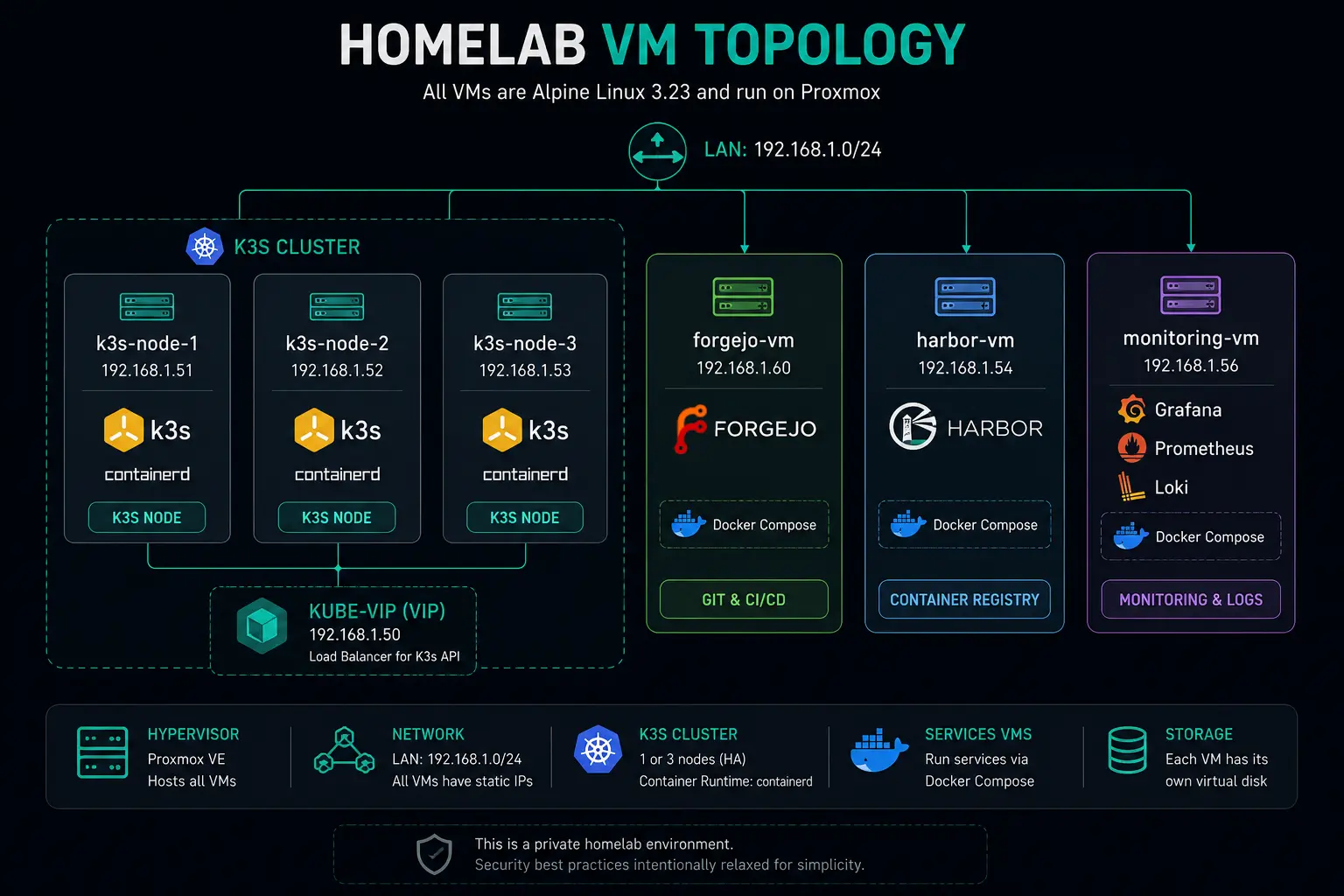
Four (to six) VMs are provisioned in total:
- k3s node(s): the Kubernetes control-plane and worker nodes (more on this later)
- Harbor VM: runs the private container registry as a Docker Compose stack
- Forgejo VM: hosts the self-hosted Git server and its Actions runner
- Monitoring VM: hosts the full observability backend (Grafana, Loki, Prometheus and Tempo) as a Docker Compose stack
All variables live in terraform.tfvars (gitignored, naturally). IP allocation looks like this:
| Host | IP |
|---|---|
| k3s VMs | 192.168.1.51-53 |
| kube-vip VIP | 192.168.1.50 |
| Harbor VM | 192.168.1.54 |
| Monitoring VM | 192.168.1.56 |
| Forgejo VM | 192.168.1.60 |
| MetalLB pool | 192.168.1.65–.75 |
Note
kube-vip is only deployed in multi-node k3s installations. In a single-node setup, it is not installed.
Layer 2: Base Configuration with Ansible
After Terraform, a single ansible-playbook site.yml takes the cluster from “bare Alpine VMs” to “fully operational infrastructure.” The ansible roles run in a deliberate order and cover everything: APK repositories, Docker installation, application deployment, Kubernetes bootstrapping and add-on installation.
Alpine-specific quirks this had to handle:
- Using
doasinstead ofsudo(privilege escalation in Ansible needed adjustment) - OpenRC instead of systemd (
service→rc-service,enabled→rc-update add) - Manual cgroup mounts for k3s (Alpine does not mount them by default)
- Kernel modules via
/etc/modulesrather thanmodprobe.dconfigs
Each of these is a small thing. Together, they account for about 30% of the time I spent that “should not have been necessary.”
Layer 3: The Kubernetes Cluster (k3s)
The cluster runs k3s, which is the sensible choice when your CPU was from the stone-age era. The initial design had three nodes with embedded etcd and full control-plane HA. Every node was both control-plane and worker.
Then reality intervened.
A 3-node cluster on this hardware works ok-ish when the cluster is idle. The moment you start deploying actual test workloads (which is, after all, the entire point of having a disposable lab), resource contention becomes a real problem. The etcd quorum overhead alone adds up and with six VMs each competing for a slice of 12 GB of RAM, things got unpleasant fast.
The solution was easy at that point: shrink to a single, bigger node. One VM with more CPU and RAM allocation instead of three smaller ones. It sounds like going backwards, but it actually solved the problem cleanly (and here I’m not even considering that 3 VMs - so 3 ETCD processes - writing a ton of data on a single SSD). The cluster became stable under workload, the operational overhead of managing a 3-node setup disappeared and the resource budget freed up by decommissioning two VMs went directly into the test workloads that needed it. For a disposable lab where HA is a nice-to-have rather than a requirement, it was the right call.
Key components:
kube-vip provides a virtual IP (192.168.1.50) for the Kubernetes API server and is only deployed in multi-node configurations. In the current single-node setup it is not running; the IP address is still reserved in the allocation table so that the inventory and tooling do not need to change if the cluster is ever expanded again.
Cilium is the CNI, running in a configuration that many homelab setups skip:
- Native routing (no VXLAN overlay, real IP routing between pods)
- kube-proxy replacement (Cilium takes over all iptables rules via eBPF)
- DSR (Direct Server Return) for LoadBalancer services
- Hubble for L3/L4/L7 network observability with Prometheus metrics
Why not Flannel or Calico? Because Cilium is what I use in my production clusters, so it is worth the extra configuration complexity. Also because the Hubble network flow metrics are genuinely useful.
MetalLB handles LoadBalancer service IPs via ARP (L2 mode). Combined with Cilium DSR, external traffic hits MetalLB for IP assignment and then bypasses the kube-proxy path entirely for response traffic, reducing hops and CPU on the (limited) hardware.
nginx-gateway-fabric provides Ingress using the Gateway API (Gateway/HTTPRoute resources rather than the classic Ingress object). It is the more modern approach and forces familiarity with the Gateway API spec, which is where the ecosystem is heading.
One notable quirk: nginx-gateway-fabric does not support requestRedirect.path filters. Path-only rewrites require URLRewrite instead, something that cost me more debugging time than I would like to admit and is now firmly documented.
![NOTE] I created by default an HTTPRoute for /dashboard URL, exposing Headlamp. It’s a kubernetes web GUI which from time to time could be helpful during tests.
Layer 4: The Services
Harbor runs as a Docker Compose stack and serves as the private container registry. Trivy vulnerability scanning is enabled, a Prometheus-compatible metrics endpoint is exposed and the admin user is created and fully accessible immediately after the Ansible run completes.
That said, Harbor has a deliberate gap: proxy cache projects are not pre-configured and this is intentional. Harbor does not expose an API or CLI for creating proxy cache repositories in a way that can be cleanly automated. Rather than hack something together that would be fragile or opinionated about which upstream registries you want to mirror, the role leaves that decision to the operator. Before using Harbor as a pull-through cache for Docker Hub, GHCR, or anything else, you need to log into the UI, create the proxy cache projects you want and then configure k3s to use the registry. The infrastructure to support all of that is there and running; the policy decisions about what to cache are yours to make.
k3s can absolutely use Harbor once that is done, but it is not wired up by default, because “configure Harbor to cache X registry” is a choice that should not be baked into the provisioning layer.
Forgejo is the self-hosted Git server (a fully open-source Gitea fork). It runs with an Actions runner and Docker-in-Docker support and this one is fully ready to use the moment Ansible finishes. No extra steps. Create a repository, push code, write a workflow file in .forgejo/workflows/ and Actions will pick it up and run it. The runner is registered, the Docker-in-Docker sidecar is running and the whole pipeline is operational. The goal here was exactly the “zero post-install configuration” property: you should be able to start committing and running CI pipelines immediately, which is what you want when you are spinning up a disposable lab to test something specific.
Layer 5: Observability
This is the part that consumed the most configuration work. It is also the least tested part tbh: the observability stack is not something I actively need right now, but I implemented it anyway to future-proof the project. When the time comes to run observability tests, everything will already be in place.
The observability stack is built around OpenTelemetry (which I am actively learning and experimenting with) as the collection layer and Grafana, Loki, Tempo and Prometheus as the backends. All four backends run as a Docker Compose stack on the dedicated monitoring VM (192.168.1.56). Rather than scraping metrics directly from the backends, I opted for a push model, which also justifies having a dedicated monitoring VM in the first place.
The collection architecture has three components:
- OTel DaemonSet (one pod per k3s node): collects host metrics, kubelet stats and container/pod logs
- OTel Deployment (single replica): collects cluster-wide signals, including Kubernetes object state, events and Cilium Hubble flow metrics
- OTel agent on service VMs (Harbor, Forgejo, Monitoring VM itself): collects host metrics and scrapes application-specific Prometheus endpoints
What gets collected:
- Metrics: host resources, kubelet stats, k8s object counts, Cilium Hubble flows (DNS queries, HTTP request rates/latencies, TCP stats, packet drops)
- Logs: all pod logs, container logs from Harbor and Forgejo
- Traces: OTLP-compatible application traces (both gRPC and HTTP). This is the least validated part of the stack.
Seven Grafana dashboards cover the full picture: cluster overview, node-level details, workload metrics, Harbor state, Forgejo activity, observability pipeline health and Cilium Hubble network flows. A fair warning: some collectors or some panels may not be fully functional, as the configurations and the dashboards were AI-generated to reduce time spent on this section and have not been thoroughly validated against live data.
Problems Faced
The 3-node cluster that could not handle actual work. Already covered above, but worth re-emphasizing: a cluster that works under zero load is not actually working. The 3-node topology looked correct on paper and fell apart under real workloads. Consolidating to a single larger node was the right call and should probably have been the first call, given the hardware budget.
12 GB of RAM. It’s the cause of the point reported above! The real final boss. Every architectural decision (Alpine, k3s instead of full Kubernetes, no kube-prometheus-stack, single large node over three small ones) traces back to this number. You learn to be efficient when you have to be.
Alpine’s doas vs sudo. Ansible’s become module defaults to sudo. Alpine ships with doas. First run of every playbook: failure. Solution: configure
become_method: doasglobally, install doas, write a/etc/doas.conf. Simple in hindsight, non-obvious at 11pm. At least the error messages were loud enough to find quickly (small mercies).cgroup v2 and k3s on Alpine. Alpine does not mount cgroup v2 by default. k3s needs it. The fix involves
/etc/fstabentries and OpenRC mounts. This is documented nowhere obvious and requires reading k3s GitHub issues until you find the right comment from 2022.nginx-gateway-fabric and URLRewrite. Already mentioned above, but worth repeating:
requestRedirectwith a path change does not work. The error message is not particularly helpful. The solution (useURLRewritefilter) is in the NGF docs but not in the error output.
The (Partial) Tool Stack
| Layer | Tool | Version |
|---|---|---|
| Hypervisor | Proxmox VE | latest |
| OS | Alpine Linux | 3.23.4 |
| Kubernetes | k3s | v1.36.1+k3s1 |
| CNI | Cilium | v1.19.4 |
| HA API | kube-vip | latest |
| LoadBalancer | MetalLB | v0.16.0 |
| Ingress | nginx-gateway-fabric | v1.5.0 |
| Registry | Harbor | v2.14.4 |
| Git server | Forgejo | 15-rootless |
What to Do Differently in Production
The bare minimum is:
- Secrets management from day one. Plain-text passwords in YAML are fine for a “disposable” homelab, but the habit is bad. Vault or SOPS would cost almost nothing in complexity and build better muscle memory.
- Pin all image tags from the start.
- TLS everywhere. Even self-signed. The absence of TLS means some tooling (notably Cilium’s Hubble relay) requires extra workarounds. cert-manager on k3s is cheap to operate and the habit is worth building.
- Improve code organization. This project was born to be used in a homelab, not in prod. So a multiple things at multiple levels could be done to make it production-usable.
Was It Worth It?
Absolutely. The goal was to build a lab that behaves as much as possible like production, so that testing against it is actually meaningful and it could be adapted to more specific needs. When you spin it up to validate a new Cilium config or test a Forgejo Actions pipeline, you are working with the same tooling, the same API surface and the same networking behavior you would face in a real cluster. When you are done, terraform destroy takes it all back. No cleanup scripts, no half-deleted resources, no leftover state.
The fact that it all runs on a laptop with a dual-core CPU from 2013 is either a testament to how far the ecosystem has come, or a warning sign about my judgment. Probably both. Anyway it was so fun!
The code is hosted on my private Forgejo instance, organized as a Terraform directory for provisioning and an Ansible directory for configuration. If you want to replicate this setup, reach out and I will share it with you.
PS: Sorry, I’m trying to avoid GitHub or any other external Git repo for my stuff as much as I can, that’s the reason why I’m not pasting a link to the code directly.